What is Captions?
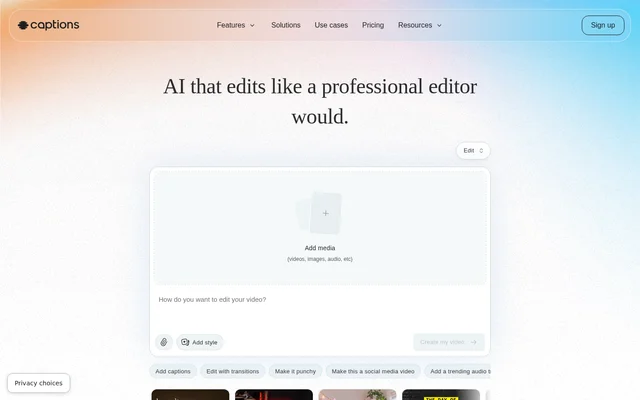
Captions is an AI video editor for creating finished videos from existing footage or generating new footage without recording. Captions serves content creators producing social videos, advertisements, tutorials and promotional content. The editor combines automatic video production with a chat-based interface that allows users to request changes without advanced editing experience.
Captions handles tasks such as scene cutting, styling, captions and audio adjustments within the same app. Users can let AI edit an entire video, select a visual style and then change details. Captions also supports digital avatars and AI twins for videos that do not depend on newly recorded footage.
What Captions can do
Captions combines footage editing, captioning, translation and generative media tools. The available capabilities cover both visual production and audio cleanup, with options for changing an existing recording or building new material. Captions also provides editing styles that can be applied to the same footage to produce different presentations.
- Captions automatically cuts scenes and adds B-roll, custom zooms, transitions and music.
- Captions creates automatic captions with stylized fonts and translated subtitles in 100+ languages.
- Captions generates digital avatars and AI twins with prompt-based outfit and background changes.
- Captions corrects eye contact and removes unwanted background noise.
- Captions trims pauses, filler words and other interruptions.
- Captions generates royalty-free music and sound effects.
- Captions turns long videos into batches of post-ready clips.
How Captions works
Captions is accessible through a browser or mobile apps downloaded from the App Store and Google Play. Users can upload or record footage, choose an editing style and let AI apply edits across the video. The automatic workflow can add B-roll, transitions, music and custom zooms before users make further adjustments.
Captions accepts simple text prompts through its chat-based editor for changes and updates. Users can also start with generated footage or select a digital avatar instead of recording themselves. Avatar prompts can change outfits, backgrounds and product inserts, allowing the same avatar to appear across different topics and videos.
Who Captions is for
Captions is aimed at content creators who want to produce videos without advanced editing skills. Supported formats include vertical and horizontal video, and the stated applications range from social content to product assets. Captions also supports creators who need translated subtitles or want to reuse longer recordings as shorter clips.
- Captions supports short-form social videos and reels.
- Captions supports video ads, promotional content and product assets.
- Captions supports tutorials and podcast clips.
- Captions supports avatar-led videos across different topics.
Captions pricing and plans
Captions offers a free version with basic tools such as trimming, transitions and some media library assets. Paid plans provide generative AI features and more advanced editing tools. Max costs $24.99/mo and includes 500 credits per month, while Frontier starts at $69.99/mo with 1,400 credits per month.
Captions lists higher Frontier usage tiers at $139.99/mo and $279.99/mo, with 2,800 and 5,600 monthly credits respectively. Published prices are in USD, may incur location-based taxes and reflect iOS plans only. Captions also directs businesses producing videos at scale to contact sales about Tesseract.
Captions strengths and limitations
Captions combines automatic editing, captions, translation, avatars and audio tools in a single editing workflow. Browser and mobile access provide different ways to work, while chat-based changes let users adjust AI-produced edits. The free version provides basic editing access, but the more advanced workflow depends on paid features and usage allowances.
- Captions reserves generative AI features and more advanced editing tools for paid subscriptions.
- Captions assigns monthly AI credits according to the selected paid plan.
- Captions publishes pricing and feature details specifically for iOS plans.
Captions FAQ
What is Captions?
Captions is an AI video editor that turns existing footage into edited videos or generates new footage without recording. Captions combines automatic editing, captions, translated subtitles, digital avatars and chat-based adjustments for content creators.
Is Captions free?
Captions offers a free version with basic tools including trimming, transitions and some media library assets. Captions requires a paid subscription for generative AI features and more advanced editing tools; published iOS Max pricing is $24.99/mo.
What devices can you use Captions on?
Captions is available on the web, iOS and Android. Captions users can sign up through a browser on a computer or download the mobile app from the App Store or Google Play.
Can Captions edit an entire video automatically?
Captions can automatically edit and stylize an uploaded or recorded video with scene cuts, custom zooms, B-roll, music and transitions. Captions also provides an editor for adjustments and accepts simple prompts to direct changes.
Can Captions translate video subtitles?
Captions can translate and subtitle videos in 100+ languages. Captions also creates automatic captions with stylized fonts and offers caption styles, supporting creators who need subtitles or different visual treatments for their videos.
Do Captions credits roll over?
Captions rolls unused credits over to the next month. Captions allows users to save up to two extra months of unused credits, so the balance can hold up to 3× the monthly allowance.
From the community
No reviews yet
Be the first to review this tool. What you write helps the next person choose.