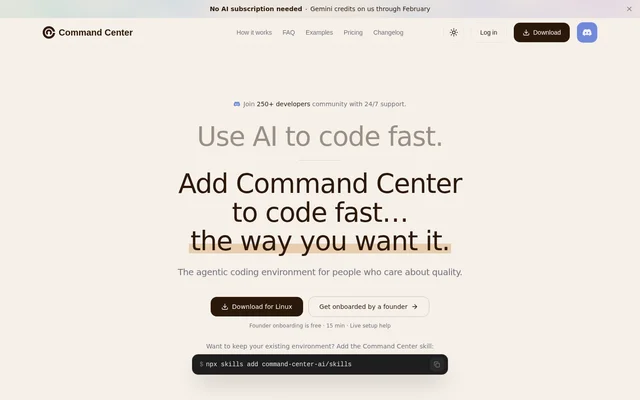
What is Command Center?
Command Center is an agentic coding environment for developers who need to understand and maintain AI-generated code before shipping. Command Center combines coding agents, guided review, and refactoring in a shared workflow. The product addresses engineering work beyond generating code, including reading large changes, requesting revisions, and preparing changes for merge.
Command Center supports macOS, Windows, and Linux and runs locally. Developers can download the app, run Command Center in a local browser, or add the Command Center skill to an existing environment. The available access paths include both a dedicated environment and an option for developers who want to keep their current tools.
What Command Center can do
Command Center brings agent execution and code review into the same workflow. Guided walkthroughs present changes in logical order rather than alphabetical file order, while refactoring and feedback agents support cleanup and corrections. Developers read the changed code itself rather than relying only on a generated summary.
- Command Center runs Claude Code, Codex, and OpenCode in one workspace.
- Command Center turns large diffs into guided code walkthroughs.
- Command Center identifies duplication, brittle design, and maintainability issues before merge.
- Command Center opens fresh feedback agents for targeted review fixes.
- Command Center switches between parallel workspaces with a keystroke.
How Command Center works
Command Center lets developers choose a coding agent and prompt that agent as usual. Separate workspaces support different tasks, with keyboard switching between them. After code generation, developers can use the refactoring agent, follow a walkthrough of the changes, request fixes as they read, and then commit and open a pull request.
Command Center ships with git and a modified version of OpenCode called CC Basic, so an existing coding-agent installation is optional. Command Center does not send code to its servers during local operation. AI requests using free Gemini credits pass through its servers but are not retained; the page also offers bring-your-own-key or subscription access.
Who Command Center is for
Command Center serves developers performing complex engineering tasks from building and understanding code to refactoring and shipping changes. The workflow is relevant when coding agents produce large changes that still need human review. Command Center also supports developers managing several agent tasks who want to move between workspaces without juggling separate tool windows.
- Developers can inspect large AI-generated pull requests through ordered walkthroughs.
- Developers can clean up duplicated code and brittle abstractions before merging.
- Developers can request focused corrections while reviewing a change.
- Developers can run separate engineering tasks in parallel workspaces.
Command Center pricing and plans
Command Center offers a free tier with limits on walkthroughs, refactoring, and simultaneous workspaces. Starter costs $9 per month or $89 per year billed annually. Pro costs $19 per month or $189 per year billed annually. Paid plans unlock higher limits, but the supplied page does not specify the individual usage allowances.
Command Center also offers free founder-led onboarding with live setup help lasting 15 minutes. Developers can obtain Command Center through the download option or choose local browser access. Developers keeping an existing environment can add the Command Center skill using the command npx skills add command-center-ai/skills.
Command Center strengths and limitations
Command Center combines agent work, code inspection, and cleanup rather than treating code generation as the entire engineering process. Local operation, bundled development tools, and support for several coding agents provide different starting points. Guided walkthroughs focus on reading actual changes, while feedback agents allow corrections during that review.
- Command Center restricts walkthroughs, refactoring, and simultaneous workspaces on the free tier.
- Command Center routes free Gemini-credit requests through its servers without retaining them.
- Command Center supports the Gemini CLI but identifies that CLI as deprecated.
Command Center FAQ
What is Command Center?
Command Center is an agentic coding environment for developers working with AI-generated code. Command Center combines coding agents, guided walkthroughs of large diffs, pre-merge refactoring, and feedback agents so developers can build, review, revise, and ship changes within one workflow.
Is Command Center free?
Command Center offers a free tier with limits on walkthroughs, refactoring, and simultaneous workspaces. Starter costs $9 per month or $89 per year billed annually, while Pro costs $19 per month or $189 per year billed annually. Paid plans provide higher limits.
Which coding agents does Command Center support?
Command Center supports Claude Code, Codex, and OpenCode, and also works with the deprecated Gemini CLI. Command Center ships with its own modified version of OpenCode, called CC Basic, so developers can start without installing a separate coding agent.
Does Command Center keep code private?
Command Center runs locally and states that code is not sent to its servers. AI requests made with free Gemini credits pass through Command Center servers but are not retained. Command Center also supports using a developer's own key or subscription.
How do you install or access Command Center?
Command Center is available for macOS, Windows, and Linux through an app download, with a local browser option also offered. Developers can add the Command Center skill to an existing environment using npx skills add command-center-ai/skills. Free founder-led onboarding provides live setup help.
From the community
No reviews yet
Be the first to review this tool. What you write helps the next person choose.