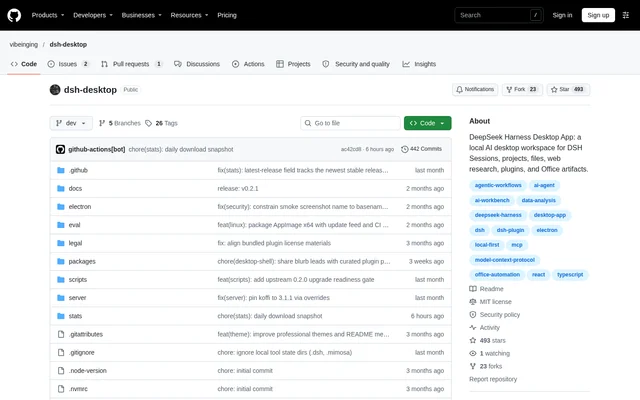
What is DSH Desktop?
DSH Desktop is an open-source desktop distribution that brings the official DeepSeek Harness runtime, official web interface and community plugins into a shared workspace. DSH Desktop supports conversations, projects, files, web research and Office artifacts. The community-maintained project is independent of DeepSeek and explicitly states that no affiliation, partnership, authorization or endorsement exists.
DSH Desktop uses Electron as a desktop host rather than maintaining a separate chat interface. DeepSeek Harness remains responsible for agents, sessions, tools, skills, MCP, settings and history. The distribution adds desktop functions and bundled extensions while keeping the official DSH Profile as the authoritative source for session and plugin state.
What DSH Desktop can do
DSH Desktop combines development tools and agent-workflow extensions within the official DSH interface. Bundled capabilities cover workspace navigation, task organization, attachments, isolated Git workspaces and Office outputs. Managed plugins can be disabled or removed, while additional compatible bundles can be installed through the marketplace rather than requiring a separate plugin configuration.
- DSH Desktop provides a file tree, code editor and Markdown editing.
- DSH Desktop integrates Git operations and local terminal processes.
- DSH Desktop creates isolated Git Worktrees with associated official sessions.
- DSH Desktop supports task boards, file attachments and folder attachments.
- DSH Desktop includes bundles for Office artifacts and structured results.
- DSH Desktop lets session windows exchange messages and coordinate team tasks.
- DSH Desktop supports remote continuation from Android, a browser or another desktop.
How DSH Desktop works
DSH Desktop users download a suitable installer from GitHub Releases, launch the application and select a working directory or create a session. Files, Git and the terminal open from the sidebar, while files and folders can be added through the input area. Model credentials are managed through DSH settings and the local environment.
DSH Desktop exposes plugin management through Settings and the plugin marketplace, with the official CLI operating on the same Profile. Profile data, plugins and sessions are stored separately from the application installation directory. New Profiles initialize from pinned bundled artifacts offline; normal startup preserves existing choices rather than reinstalling plugins that users have removed.
Who DSH Desktop is for
DSH Desktop suits DeepSeek Harness users who want AI sessions and project tools in a desktop workspace. Developers can work with repositories, editors, terminals and Worktrees, while agent-workflow users can organize tasks and coordinate session windows. Remote access also supports continuing an existing workspace away from the host computer after login and explicit enablement.
- DSH Desktop supports repository work alongside agent conversations.
- DSH Desktop supports distributing dependent tasks across session windows.
- DSH Desktop supports project work involving attachments, Office artifacts and structured outputs.
DSH Desktop licensing and availability
DSH Desktop publishes project code under the MIT license and distributes installers through GitHub Releases. The repository does not describe subscription plans or product pricing. Signed and notarized macOS Apple Silicon installers are available, alongside Windows x64 installers. Linux x64 AppImage support is in testing, while macOS Intel users can run from source. Third-party components retain their own licensing and redistribution conditions.
DSH Desktop strengths and limitations
DSH Desktop emphasizes a shared official Profile, pinned community bundles and narrowly scoped desktop capabilities. Application updates perform a read-only Profile precheck and require user confirmation before downloading and installing. Recovery tools can retry startup, start safely, remove a problematic plugin or export filtered diagnostics. Marketplace listings show source, version, compatibility and permissions, but listing does not mean project review.
- DSH Desktop requires Node.js 24 or later when running from source.
- DSH Desktop remote access uses third-party account, device-directory, signaling and relay services.
- DSH Desktop remote access has no supported self-hosted server, and independent cryptographic review remains incomplete.
- DSH Desktop has no official macOS Intel installer, and Linux x64 remains in testing.
DSH Desktop FAQ
What is DSH Desktop?
DSH Desktop is an open-source, community-maintained desktop distribution for DeepSeek Harness. DSH Desktop runs the official runtime and web interface with bundled community plugins for sessions, files, Git, terminals, task management and Office artifacts.
Is DSH Desktop open source?
DSH Desktop publishes its project code under the MIT license and provides source code and packaged releases through GitHub. Third-party components, native binaries and visual assets follow their respective upstream licenses and redistribution conditions.
Which operating systems does DSH Desktop support?
DSH Desktop provides installers for macOS Apple Silicon and Windows x64. Linux x64 AppImage support is in testing, and macOS Intel has no official installer but can run from source. Source execution requires Node.js 24 or later.
Can DSH Desktop be accessed from a phone?
DSH Desktop supports continuing the same host workspace and sessions from Android, Remote Web or another desktop after login and remote-access enablement. The host makes outbound connections rather than opening a public listening port. Current remote access depends on third-party services.
How do plugins work in DSH Desktop?
DSH Desktop manages plugins through the marketplace in official settings or through the official CLI, using the same DSH Profile. The marketplace supports discovering, installing, updating, disabling and uninstalling plugins, and displays their source, version, compatibility and permissions.
Is DSH Desktop an official DeepSeek application?
DSH Desktop is an independent community project built on DeepSeek Harness and the Cordis plugin system. DSH Desktop explicitly states that the project has no affiliation, partnership, authorization or endorsement relationship with DeepSeek.
From the community
No reviews yet
Be the first to review this tool. What you write helps the next person choose.