What is ego-lite?
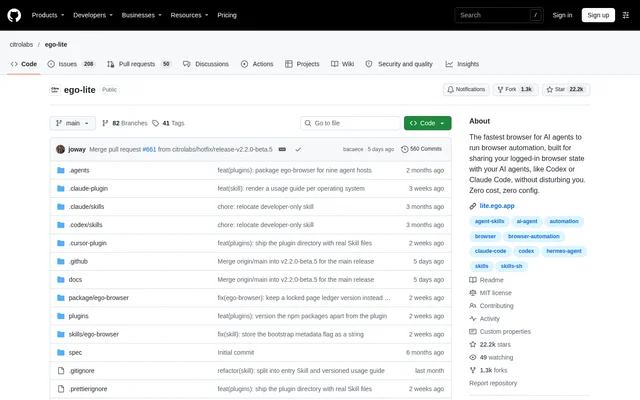
ego-lite is an open-source browser automation project with a separate browser application for people working with AI agents. The browser puts agent tasks in isolated Spaces while the user continues browsing elsewhere in the same application. This arrangement lets agents access authenticated web sessions without taking over the user's active tabs.
ego-lite connects existing agent CLIs to the browser rather than requiring a built-in assistant. The source names Claude Code, Codex, Cursor, and custom agent CLIs as supported connections through ego-browser. The repository contents carry the MIT License, while the browser application is distributed as a separate, free download.
What ego-lite can do
ego-lite exposes browser operations as JavaScript functions that an agent can compose into a task. Structured page Snapshots give text-only models a representation of the page, including support for deeply nested iframes. Separate Spaces support concurrent work, and users can see an active agent Space, take control, or stop the agent.
- ego-lite gives each agent an isolated browser Space.
- ego-lite runs multiple agent tasks in parallel.
- ego-lite exposes snapshot, fill, click, wait, navigate, and capture tools.
- ego-lite migrates Chrome logins, cookies, extensions, and bookmarks.
- ego-lite keeps browsing data on the user's device.
How ego-lite works
ego-lite can be installed by downloading the application, adding the ego-browser skill with npx, or asking an agent to follow the repository's installation instructions. Installing the application adds the skill to agent skills directories on the machine. A skill-only installation leads to browser installation when the agent first attempts a browser task.
ego-lite asks whether to migrate Chrome data on first launch. After setup, the user enters /ego-browser in an agent CLI and describes a task in plain language. The agent opens a page in its own Space, reads a Snapshot, executes JavaScript browser tools, and reports back while the user's tabs remain untouched.
Who ego-lite is for
ego-lite serves people who already use agent CLIs and want those agents to perform web tasks alongside everyday browsing. The source illustrates separate agents handling lead enrichment and competitor-site scraping concurrently. Shared access to migrated browser sessions also makes authenticated tasks a stated use case, without requiring agents to commandeer the user's workspace.
- ego-lite supports lead enrichment across parallel Spaces.
- ego-lite supports scraping competitor websites.
- ego-lite lets agents perform tasks using existing browser logins.
ego-lite pricing and access
ego-lite is available as a free browser download for macOS and Windows. The repository contents are released under the MIT License, a distinction from the separately downloaded browser application. Access starts through the application download or the ego-browser skill installation path; the source does not describe paid browser plans.
ego-lite strengths and limitations
ego-lite combines isolated agent workspaces, access to existing browser sessions, and connections to multiple agent CLIs. Those capabilities address concurrent browsing and automation without handing an agent the user's active tabs. Local browsing-data storage is another stated property, although the source also discloses narrow product-signal collection, such as default-browser status.
- ego-lite currently runs on macOS and Windows, with Linux on the roadmap.
- ego-lite needs the browser application even when installation begins with the skill.
- ego-lite marks reusable experience accumulation as coming soon.
ego-lite FAQ
What is ego-lite?
ego-lite is a browser automation project that gives AI agents isolated Spaces inside a shared browser. Users can continue browsing while agents complete tasks through the ego-browser connection layer, using structured page Snapshots and JavaScript browser tools.
Is ego-lite free?
ego-lite offers its browser as a separate, free download. The ego-lite repository contents are released under the MIT License. The source distinguishes the repository licence from the browser download and does not describe paid browser plans.
Which AI agents work with ego-lite?
ego-lite connects to Claude Code, Codex, Cursor, and custom agent CLIs through ego-browser. The connection exposes JavaScript tools for reading page Snapshots, filling fields, clicking, waiting, navigating, and capturing pages.
Does ego-lite work on Linux?
ego-lite currently runs on macOS and Windows, while Linux is on the roadmap. Users can start with the browser download or install the ego-browser skill, which guides browser installation when an agent first runs a browser task.
Can ego-lite use existing Chrome logins?
ego-lite offers Chrome data migration on first launch. Accepting migration brings existing logins, cookies, extensions, and bookmarks into the browser, allowing agents to use those sessions while working in their own Spaces.
Does ego-lite keep browsing data locally?
ego-lite keeps browsing data, cookies, and other browser-held data on the user's device. The source also states that ego-lite collects narrow product signals, such as whether the application has been set as the default browser.
From the community
No reviews yet
Be the first to review this tool. What you write helps the next person choose.