What is HappyHorse 1.0 AI Video Generator?
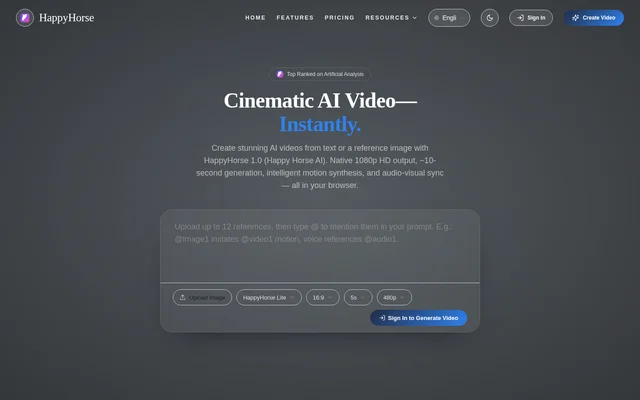
HappyHorse 1.0 AI Video Generator is a web tool for making short clips from text prompts and reference images. Creators and marketing teams can use the browser-based generator to make product shots, campaign videos, and explainers. HappyHorse 1.0 AI Video Generator offers a Lite model for initial experiments and a paid full model for native HD output and integrated audio generation.
What HappyHorse 1.0 AI Video Generator can do
HappyHorse 1.0 AI Video Generator can generate a scene from a written prompt or animate a still image with subject motion and camera movement. The full model can generate audio and video together rather than leaving sound as a separate step. The site lists cinematic, anime, documentary, and commercial styles among the available options.
- Generate a clip from a text prompt.
- Animate still images with camera movement and scene motion.
- Use video and audio references to guide a render.
- Render native 1080p video without upscaling.
- Generate lip-sync, ambient sound, and multilingual voiceover with the video.
How HappyHorse 1.0 AI Video Generator works
HappyHorse 1.0 AI Video Generator runs in a web browser. A text-to-video workflow starts with a prompt and lets the user choose aspect ratio, duration, and resolution before rendering. For reference-driven clips, the full model accepts up to 12 combined inputs across text, images, videos, and audio. The site recommends reusing prompt structures and reference images to keep framing and visual style consistent across renders.
Who HappyHorse 1.0 AI Video Generator is for
HappyHorse 1.0 AI Video Generator is aimed at creators and teams that make short promotional, educational, or entertainment clips. Marketers can test different opening hooks for paid campaigns, while storefront owners can make seasonal clips from product photos. App and SaaS teams can show before-and-after workflows, and music creators can make short visuals with synchronized sound and lip movement.
- Make product hero shots for launch reels.
- Generate ad variations for A/B testing.
- Show before-and-after workflows in app explainers.
- Create seasonal storefront promotions from product images.
- Produce short music and lip-sync videos.
HappyHorse 1.0 AI Video Generator pricing and plans
HappyHorse 1.0 AI Video Generator offers starter credits for HappyHorse Lite and charges for access to the full model. The pricing page lists Basic at $250 per year, Pro at $500 per year, and Max at $1,000 per year. The plans allocate different credit totals, and Pro and Max include API access.
HappyHorse 1.0 AI Video Generator also sells one-off packs for users who do not want a subscription. The pricing page lists 500 credits for $50 and 2100 credits for $200. The page estimates that the smaller pack covers about 13 clips at 5 seconds each or 4 clips at 15 seconds each.
Strengths and limitations of HappyHorse video generation
HappyHorse 1.0 AI Video Generator combines reference-guided motion, native 1080p rendering, and audio generation in a browser workflow. Lower resolutions of 480p and 720p are also available. The site describes open-source model releases and inference code for self-hosting and fine-tuning, separate from the credit-based access offered by the browser generator.
- Starter credits apply only to HappyHorse Lite.
- HappyHorse Lite clips are capped at 12 seconds.
- Paid full-model clips are capped at 15 seconds per generation.
- Commercial use depends on platform terms and rights to reference materials.
HappyHorse 1.0 AI Video Generator FAQ
What is HappyHorse 1.0 AI Video Generator?
HappyHorse 1.0 AI Video Generator is a browser-based tool that makes short videos from text prompts or reference images. The full model also accepts video and audio references and can generate synchronized lip movement, ambient sound, and multilingual voiceover alongside the video.
Is HappyHorse 1.0 AI Video Generator free?
HappyHorse 1.0 AI Video Generator offers starter credits for HappyHorse Lite, but the full model requires paid access. The site lists Basic, Pro, and Max subscriptions and also sells one-off credit packs for users who do not want a subscription.
How long are videos made with HappyHorse 1.0 AI Video Generator?
HappyHorse 1.0 AI Video Generator supports clips up to 15 seconds per generation with paid access to the full model. HappyHorse Lite supports clips up to 12 seconds. Duration is a setting alongside aspect ratio and resolution.
Can HappyHorse 1.0 AI Video Generator create audio and lip-sync?
HappyHorse 1.0 AI Video Generator can generate synchronized audio and video in a single pass with the full model. The audio features include lip-sync, ambient sound, and multilingual voiceover. The full model also accepts audio references to guide generation.
Does HappyHorse 1.0 AI Video Generator have an API?
HappyHorse 1.0 AI Video Generator includes API access on its Pro and Max plans, and the Max plan lists API support. The browser generator is also available for prompt-based and reference-guided video creation without using the API.
From the community
No reviews yet
Be the first to review this tool. What you write helps the next person choose.