What is Seedance 3.0?
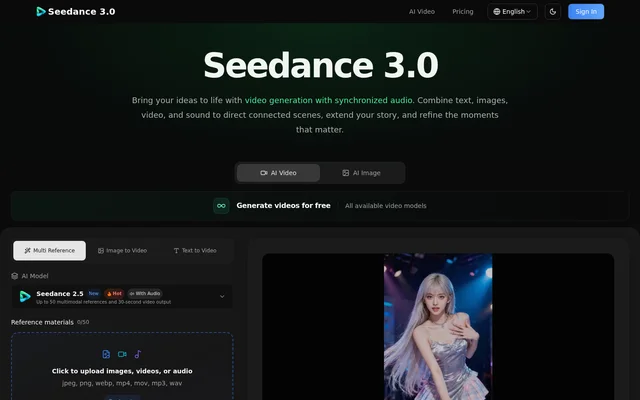
Seedance 3.0 is a web-based AI video generator that creates short clips with synchronized audio from prompts and media references. Filmmakers can use Seedance 3.0 to test how a scene might look and sound before a shoot, while marketers and educators can use the same workflow to develop product stories or visual demonstrations. The website shows options for text-to-video, image-to-video, and generation with multiple references.
What Seedance 3.0 can do
Seedance 3.0 uses different kinds of references to guide different parts of a scene. An image can establish a character's look or a product's appearance, a video clip can guide framing or movement, and audio can guide vocal character, mood, or rhythm. Users can specify which parts of each reference should carry into the result.
- Seedance 3.0 generates videos from text prompts or still images.
- Seedance 3.0 uses references to guide character details, props, and lighting across shots.
- Seedance 3.0 generates voices, ambience, and sound effects alongside visuals.
- Seedance 3.0 extends clips or edits visual and audio elements from a prompt.
How Seedance 3.0 works
Seedance 3.0 lets users start with a written brief or upload images, video, and audio. The prompt can describe what happens, where the camera moves, and which reference should guide each part of the scene. The interface also offers an end-frame option and a library for reusing media from earlier creations.
Seedance 3.0 supports a review and refinement workflow. After generating a clip, users can adjust the prompt or references to try another version. For a quick check of the visuals and motion, the interface offers a 480p draft preview before creating a 1080p final. Users can also extend the result if they want to continue the scene.
Who Seedance 3.0 is for
Seedance 3.0 serves people planning or producing short videos. A marketing team can turn product photos into a reveal or explore alternate openings for a campaign. A filmmaker can test shot composition and camera moves before production, while an educator can use reference material to illustrate a historical scene, scientific idea, or step-by-step process.
- Explore product reveals, demonstrations, and ad concepts.
- Develop short films and connected character scenes.
- Test camera moves, shot composition, and choreography before filming.
- Create visual lessons and training demonstrations.
- Develop clips for Instagram Reels, TikTok, and YouTube Shorts.
Strengths and limitations of Seedance 3.0
Seedance 3.0 brings visual direction and sound into the same generation workflow, which lets users review how camera movement, pacing, and audio fit together. Shared references can help carry details such as clothing, props, voices, and lighting across shots. For stories that need more time than a single generation allows, the extension workflow continues an existing clip with new action.
- A single generation is limited to 30 seconds.
- Longer stories use extensions rather than a single generation.
- Draft previews are generated at 480p rather than the 1080p final resolution.
Getting started with Seedance 3.0
Seedance 3.0 can start with a short scene brief that describes the action and camera direction. For a product reveal, for example, a product photo can guide appearance while the prompt specifies a close-up or a slow push-in. A video reference can guide the pacing, and an audio reference can guide the mood. The draft preview gives users a way to check the motion before refining the prompt or generating the final clip.
Seedance 3.0 FAQ
What is Seedance 3.0?
Seedance 3.0 is a web-based AI video generator for creating and refining short clips with synchronized audio. It supports text-to-video, image-to-video, and multiple media references that can guide characters, settings, motion, and sound.
How long can Seedance 3.0 videos be?
Seedance 3.0 can create up to 30 seconds of video and audio in a single generation. For a longer story, users can extend an existing video with new action or connected scenes.
What inputs does Seedance 3.0 accept?
Seedance 3.0 accepts text prompts and image, video, and audio references. Users can specify what each reference should guide, such as the look of a character, the framing of a shot, or the rhythm of a clip.
Does Seedance 3.0 generate audio with video?
Seedance 3.0 generates synchronized voices, environmental ambience, and sound effects alongside the visuals. Users can supply audio references to guide vocal character, mood, and rhythm as part of the same workflow.
Can Seedance 3.0 extend or edit an existing video?
Seedance 3.0 can extend an existing video with new action or connected scenes and can also edit visual or audio content. Users describe the changes they want in plain language and can provide references to guide the result.
From the community
No reviews yet
Be the first to review this tool. What you write helps the next person choose.