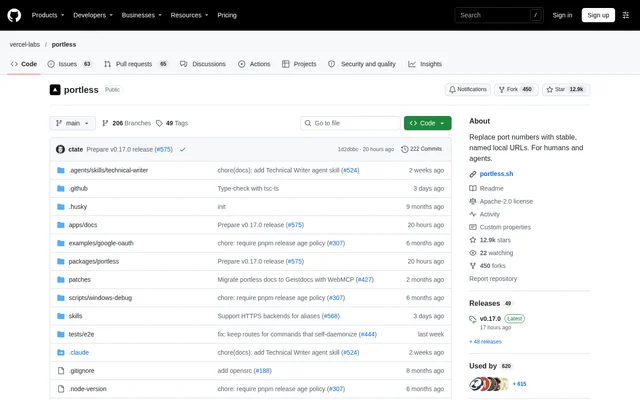
What is portless?
portless is an open-source reverse proxy for local development that gives development servers stable, named .localhost URLs. Built for developers and AI agents, portless replaces remembered port numbers with app names. Each app runs on an assigned free port while the proxy sends requests from the named URL to the matching server.
portless keeps the same URL across server restarts, so bookmarks, cookies, OAuth redirects, and agent test scripts continue pointing to the intended app. The project is published in the vercel-labs GitHub repository and distributed under the Apache-2.0 license. Documentation covers setup, commands, HTTPS, and configuration.
What portless can do
portless combines local hostname routing with development workflow support. Named URLs can represent individual apps, linked worktrees, workspace packages, or static aliases to existing services. The proxy also provides local HTTPS, while optional network modes make development apps reachable beyond the local machine.
- portless assigns free ports and routes named hostnames to development servers.
- portless serves local HTTPS with HTTP/2.
- portless gives linked git worktrees separate subdomains.
- portless configures workspace applications through a shared root configuration file.
- portless exposes route lookup and static alias management through MCP.
- portless supports LAN access and Tailscale, ngrok, or Cloudflare tunnels.
How portless works
portless can be installed globally with npm install -g portless or pinned per project with npm install -D portless. Running portless in a project with a dev script starts that script and infers an app name from package.json, the git root, or the directory. Developers can also specify a name and command explicitly.
portless starts its proxy on the first run and passes an assigned port through the PORT environment variable. For frameworks such as Vite, Astro, Angular, Expo, and Wrangler, portless adds matching port and host flags. Initial HTTPS setup creates a local certificate authority, adds system trust, and may request sudo.
Who portless is for
portless serves developers and AI agents that need predictable addresses for local applications. Worktree-aware naming supports parallel branches, while root-level monorepo configuration covers multiple workspace packages. Agents can install the supplied skill or connect an MCP client to discover routes and manage aliases without relying on remembered port numbers.
- portless keeps local OAuth redirect addresses consistent across restarts.
- portless lets developers run branch-specific app instances side by side.
- portless helps agents look up service URLs for local workflows.
- portless makes local apps accessible to phones through LAN mode.
portless pricing and access
portless is available as an open-source project under the Apache-2.0 license, with installation through npm and source code on GitHub. The supplied project documentation does not describe paid portless plans. Developers can choose a global installation or a project development dependency to pin the version used by contributors.
portless strengths and limitations
portless combines stable app addresses, automatic port assignment, worktree naming, and agent-facing route discovery in a local development workflow. portless runs on macOS, Linux, and Windows with Node.js 24 or later. The doctor command checks proxy health, routes, DNS, and certificate trust without changing configuration, then prints suggested fixes.
- portless may require sudo for initial HTTPS setup; unprivileged and plain HTTP modes are available.
- portless requires the corresponding external CLI for Tailscale, ngrok, and Cloudflare tunnel options.
- portless does not launch development servers through MCP; agents run commands in a shell.
- portless disables upstream TLS certificate verification, so TLS does not authenticate backend identity.
- portless upgrades can require renewed certificate trust when the state directory format changes.
portless FAQ
What is portless?
portless is an open-source local reverse proxy that replaces development server port numbers with stable, named .localhost URLs. portless assigns each app a free port and routes its hostname to that app, keeping URLs consistent across restarts for developers and AI agents.
Is portless free?
portless is available as an open-source project under the Apache-2.0 license, with source code on GitHub and installation through npm. The supplied portless documentation does not list paid plans or subscription pricing.
How do you install portless?
portless can be installed globally with npm install -g portless or as a development dependency with npm install -D portless. portless runs on macOS, Linux, and Windows and requires Node.js 24 or later.
Does portless support MCP?
portless provides an MCP server over stdio through portless mcp. The default core profile lists routes, looks up URLs, and manages static aliases. Additional tools add proxy control and diagnostics, but the MCP server does not start development servers.
Does portless support HTTPS?
portless serves HTTPS with HTTP/2 by default and creates a local certificate authority on the first run. Trust setup may request sudo. Developers can select plain HTTP with --no-tls or skip sudo with --unprivileged.
Can portless run multiple git worktrees?
portless detects linked git worktrees when using portless run and derives a subdomain from the final segment of the branch name. Separate worktree subdomains let branch-specific applications run alongside the main app, with options to customize the label and hostname template.
From the community
No reviews yet
Be the first to review this tool. What you write helps the next person choose.