What is PresentationGPT?
PresentationGPT is an AI presentation generator for creating slide decks that can be used with Microsoft PowerPoint and Google Slides. PresentationGPT serves people who want an AI-generated starting point rather than building a presentation from scratch, with downloadable output that can be edited in compatible presentation software.
PresentationGPT uses LISA, a proprietary in-house language model trained and optimized to generate presentations. PresentationGPT states that presentations can be generated in seconds and identifies English as a supported language. The website also displays example presentations on the Big Bang, Dubai, Tesla, and Cyrus the Great.
What PresentationGPT can do
PresentationGPT combines AI slide generation with design choices, sharing, and downloadable presentation formats. PresentationGPT provides editable output for continued work in presentation software, alongside a non-editable PDF option. The website also lists file-upload generation and APIs, extending the available options beyond creating and downloading a deck.
- PresentationGPT generates presentations using LISA.
- PresentationGPT offers background, theme, and text color choices.
- PresentationGPT produces editable PowerPoint files and Google Slides decks.
- PresentationGPT provides non-editable PDF downloads.
- PresentationGPT lists slide generation from file uploads.
- PresentationGPT offers presentation generation APIs.
How PresentationGPT works
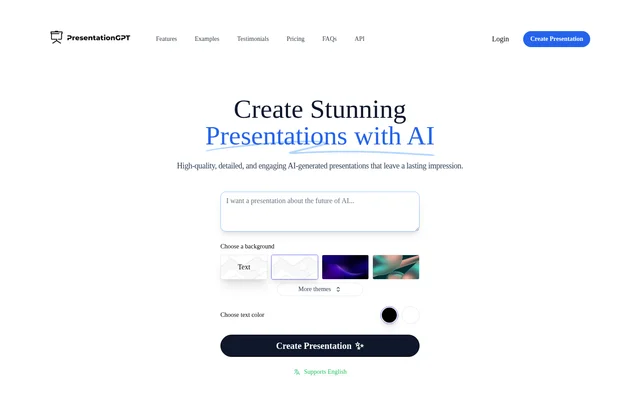
PresentationGPT presents background, theme, and text color controls alongside a presentation creation action. PresentationGPT allows users to create and share presentations for free, then pay when downloading. After downloading an editable presentation, users can make changes in Microsoft PowerPoint or Google Slides rather than keeping the generated deck unchanged.
PresentationGPT distinguishes editable presentation formats from non-editable PDF output. PowerPoint files and Google Slides decks support subsequent changes, while the listed download options also cover offline use and printing. PresentationGPT separately invites developers to integrate its AI presentation generation APIs into their services.
Who PresentationGPT is for
PresentationGPT is relevant to people who need generated slide decks and want to keep working in PowerPoint or Google Slides. PresentationGPT also addresses developers through its API offering. The source does not identify specific professions or industries, so the clearest audience distinction is between presentation creators and service developers.
- Presentation creators can generate a starting deck instead of beginning from scratch.
- PowerPoint and Google Slides users can edit downloaded decks.
- Users can share generated presentations or download them for offline use.
- Developers can integrate presentation generation into their services.
PresentationGPT pricing and plans
PresentationGPT offers free unlimited presentation creation and sharing, with payment required for downloads. PresentationGPT lists a Free Plan, a Pay Per Download option, and an Unlimited Downloads Subscription at $12/mo. Basic design templates appear in the plan information. The download subscription provides an alternative to paying for individual downloads.
PresentationGPT strengths and limitations
PresentationGPT combines free creation and sharing with output for familiar presentation tools. PresentationGPT supports continued editing through PowerPoint and Google Slides, while PDF provides a separate non-editable format. These options distinguish generating and sharing a presentation from obtaining a downloadable file, which the website describes as a paid action.
- PresentationGPT requires payment for downloads.
- PresentationGPT PDF output is non-editable.
- PresentationGPT names English as a supported language but does not identify additional languages.
PresentationGPT FAQ
What is PresentationGPT?
PresentationGPT is an AI presentation generator powered by LISA, a proprietary in-house language model trained for presentation generation. PresentationGPT creates slide decks compatible with Microsoft PowerPoint and Google Slides and offers PDF output.
Is PresentationGPT free?
PresentationGPT allows unlimited presentation creation and sharing for free, but downloads require payment. PresentationGPT lists a pay-per-download option and an unlimited-download subscription priced at $12/mo, alongside its Free Plan.
Can PresentationGPT presentations be edited in PowerPoint or Google Slides?
PresentationGPT offers editable PowerPoint files and editable Google Slides decks. PresentationGPT states that users can make changes after downloading presentations, allowing generated decks to be revised in those presentation tools.
What download formats does PresentationGPT offer?
PresentationGPT lists editable PowerPoint files, editable Google Slides decks, and non-editable PDF output. PresentationGPT describes downloaded presentations as suitable for offline use and printing, with editing available through the editable formats.
Does PresentationGPT have an API?
PresentationGPT offers AI presentation generation APIs for integration into other services. PresentationGPT promotes this option separately from its presentation creation interface, but the supplied page does not provide API pricing or implementation details.
What design options does PresentationGPT provide?
PresentationGPT provides controls for choosing a background, selecting themes, and choosing text color. PresentationGPT also lists access to basic design templates in its plan information and identifies English as a supported language.
From the community
No reviews yet
Be the first to review this tool. What you write helps the next person choose.