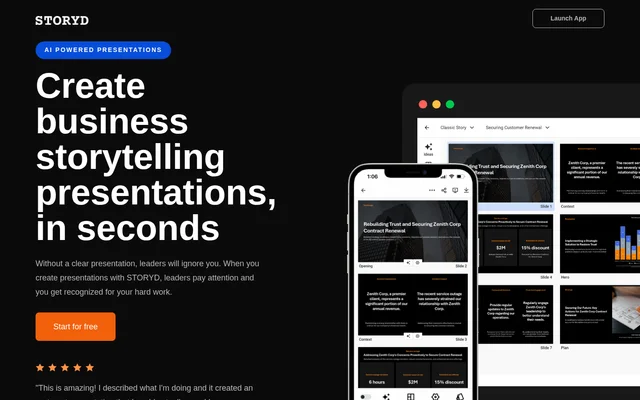
What is Storyd?
Storyd is an AI-powered business presentation maker for professionals who need to explain ideas clearly and help audiences make decisions. Storyd combines topic-based slide generation with business communication structures, editable content, and presentation branding. The product focuses on business storytelling rather than slide design alone.
Storyd is a product of Data Advantage, whose founders are Zack Mazzoncini and Michael Grimm. The website presents Storyd as a response to the difficulty of making business presentations compelling. Its workflow brings together a short written brief, a selected communication structure, and a generated business deck.
What Storyd can do
Storyd provides tools for drafting presentation content, adjusting the story, and controlling slide appearance. Users can develop their own topic or adapt a pre-written business presentation. Content editing includes AI assistance, while design controls cover organizational branding, slide previews, and layouts intended for data storytelling.
- Storyd generates a business deck from a few sentences and a selected communication structure.
- Storyd rephrases, brainstorms, shortens, and expands presentation content.
- Storyd supports text, lists, images, charts, and numbers.
- Storyd extracts an organizational theme and font from an uploaded deck.
- Storyd lets users set themes, fonts, colors, logos, footers, dates, and page numbers.
- Storyd offers story starters that users can copy and customize.
- Storyd exports presentations to PowerPoint, Google Slides, Keynote, and Canva.
How Storyd works
Storyd starts with a topic described in a few sentences. Users then select a best-practice business communication structure, and Storyd generates a professional deck in 60 seconds, according to the website. Users can subsequently revise the story with AI editing tools or switch storytelling approaches.
Storyd lets users preview each slide and choose its theme, font, and colors. An existing deck can supply the organizational theme and font through an upload. Users can present from the browser or export to supported presentation applications. Pro adds live collaboration with colleagues, while Automate provides API access.
Who Storyd is for
Storyd serves business professionals preparing presentations for leaders and other business audiences. Its story starters can be browsed by industry or department, giving users a starting point relevant to their work. The paid plans distinguish between individuals and teams creating presentations and companies or developers seeking to automate presentation production.
- Storyd helps professionals turn a written topic into a structured business presentation.
- Storyd helps users customize existing story starters for their own situation.
- Storyd supports teams editing presentation content together in real time.
- Storyd supports companies and developers automating presentations through API access.
Storyd pricing and plans
Storyd offers a Free plan at $0 with 5 credits for creating or rewriting presentations, with no credit card required to start. Free includes AI-personalized content, business templates, custom themes and branding, browser presenting, and exports to PowerPoint, Google Slides, Keynote, and Canva.
Storyd Pro costs $18 per month with annual billing or $24 per month with monthly billing. Pro includes unlimited credits, priority access, team collaboration, and real-time editing. Automate costs $100 per month with annual billing or $150 per month with monthly billing, offering unlimited users, 50 presentation credits per month, branded themes, and API access. The website directs Automate customers to contact the company.
Storyd strengths and limitations
Storyd combines business storytelling structures, AI content editing, and branding controls in a presentation workflow. The free plan includes exports and custom branding, allowing users to test more than content generation alone. The main access constraints concern usage credits and the separation of collaboration and automation capabilities into paid plans.
- Storyd Free limits creation or rewriting to 5 credits.
- Storyd reserves team collaboration and real-time editing for Pro.
- Storyd lists API access under the paid Automate plan.
Storyd FAQ
What is Storyd?
Storyd is an AI-powered business presentation maker that turns a short topic description and a selected communication structure into a slide deck. Storyd includes AI content editing, branding controls, customizable story starters, browser presenting, and presentation exports.
Is Storyd free?
Storyd offers a Free plan with 5 credits for creating or rewriting presentations, and no credit card is required to start. Storyd Free includes business templates, custom themes and branding, browser presenting, and exports. Paid Pro and Automate plans provide additional capabilities.
Can Storyd export to PowerPoint or Google Slides?
Storyd supports exports to PowerPoint, Google Slides, Keynote, and Canva. Storyd includes these export options in the Free plan, alongside browser presenting, personalized AI content, professional business templates, and custom themes and branding.
Can Storyd use an existing presentation's branding?
Storyd can extract an organizational theme and font from an uploaded presentation deck. Storyd also lets users choose their own theme, font, colors, logo, footer, date, and page number, with a visual preview of each slide.
Does Storyd have an API?
Storyd provides API access through its paid Automate plan for companies and developers automating presentations. Storyd Automate includes unlimited users, branded themes, and 50 presentation credits per month. The website directs prospective Automate customers to contact the company.
Does Storyd support team collaboration?
Storyd supports team collaboration and real-time editing through its Pro plan. Storyd Pro also includes everything in Free, unlimited credits, and priority access, and is described as a plan for individuals and teams.
From the community
No reviews yet
Be the first to review this tool. What you write helps the next person choose.