What is Wolfe By Slideworks?
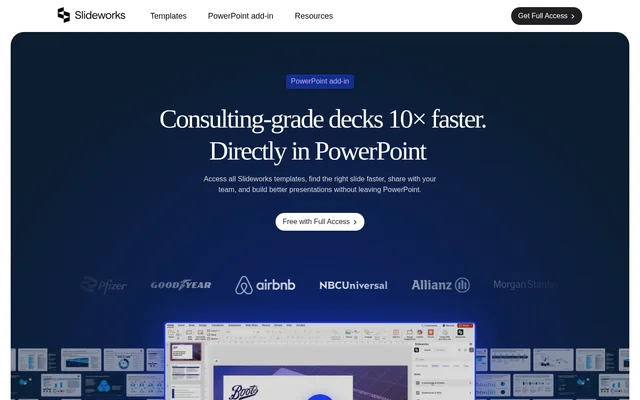
Wolfe By Slideworks is a PowerPoint add-in for finding presentation templates, improving slide layouts, and reusing shared assets inside PowerPoint. The supplied product page presents the Slideworks add-in, aimed at people building business presentations and teams managing reusable content. The template library includes slides built by former McKinsey, BCG, and Bain consultants.
Wolfe By Slideworks brings template browsing and asset management into the presentation workspace rather than requiring separate browser tabs, downloads, and local folders. Full Access includes a library of 3,500+ consulting-grade slides and future templates, while the add-in also provides access to layouts, icons, flags, maps, and other visual components.
What Wolfe By Slideworks can do
Wolfe By Slideworks combines slide discovery with a reusable content library. AI-powered search starts from a selected slide and suggests better layouts or matching alternatives. Users can also upload their own presentation materials, making approved slides and frequently used visual assets accessible alongside the supplied Slideworks content.
- Wolfe By Slideworks lets users browse, preview, and insert Slideworks templates inside PowerPoint.
- Wolfe By Slideworks suggests alternative layouts based on a selected slide.
- Wolfe By Slideworks provides access to 10,000+ layouts and visual assets.
- Wolfe By Slideworks stores uploaded decks, images, logos, and backgrounds.
- Wolfe By Slideworks supports shared team libraries of slides and assets.
- Wolfe By Slideworks keeps inserted slides editable in PowerPoint.
How Wolfe By Slideworks works
Wolfe By Slideworks can be installed directly in PowerPoint through Microsoft AppSource or the Office Add-ins menu. The library then appears inside PowerPoint, where users can search, preview, and insert content while working on a deck. Supported applications are PowerPoint for Microsoft 365 on Windows and Mac.
Wolfe By Slideworks allows users to select a slide for AI layout suggestions or upload existing decks for later reuse. When inserting a template, users can apply the destination theme to better match the current presentation. Text, colors, icons, charts, layouts, and other elements remain editable after insertion.
Who Wolfe By Slideworks is for
Wolfe By Slideworks serves people creating business presentations, small teams sharing approved content, and larger organizations with presentation libraries. Smaller teams can use the shared library in place of scattered folders and old decks. Organizations needing advanced governance or more extensive brand configuration may be better suited to the custom enterprise setup.
- Presentation creators can find alternative formats for existing slides.
- Small teams can reuse approved decks, images, and visual assets.
- Business teams can build presentations from consulting-style templates.
- Enterprise teams can arrange custom onboarding and brand adaptation.
Wolfe By Slideworks pricing and plans
Wolfe By Slideworks is included with every Full Access license, rather than offered as an independently described free product. Existing Full Access customers can download the add-in and use their Slideworks library. The included features cover AI-powered slide search, direct slide insertion, access to visual assets, and add-in updates.
Wolfe By Slideworks charges $10 per user / month for additional users, requiring one Full Access purchase. Additional users receive shared library access, centralized asset management, team-level access control, and onboarding for small teams. Enterprise arrangements use custom pricing for larger teams of 100+ users and include custom licensing, brand/template adaptation, account management, and dedicated support.
Wolfe By Slideworks strengths and limitations
Wolfe By Slideworks keeps slide search, insertion, and reusable content within PowerPoint, while preserving normal slide editing. Shared libraries help teams work from the same decks and assets. The main constraints concern licensing and brand matching: additional users are paid, and the standard add-in does not automatically rebuild templates around a company's slide master, fonts, or brand system.
- Wolfe By Slideworks requires Full Access for the included add-in.
- Wolfe By Slideworks charges separately for additional team members.
- Wolfe By Slideworks offers destination-theme matching, not automatic corporate-template conversion.
- Wolfe By Slideworks may require a custom enterprise setup for advanced governance needs.
Wolfe By Slideworks FAQ
What is Wolfe By Slideworks?
Wolfe By Slideworks is a PowerPoint add-in for searching presentation templates, inserting editable slides, and managing reusable assets. The product page describes AI-powered slide layout suggestions and shared libraries for business presentation teams.
Is Wolfe By Slideworks free?
Wolfe By Slideworks is included at no additional charge with a Full Access license. Additional users cost $10 per user / month and require one Full Access purchase. Enterprise arrangements have custom pricing.
How do you install Wolfe By Slideworks?
Wolfe By Slideworks can be installed through Microsoft AppSource or the Office Add-ins menu in PowerPoint. The library appears inside PowerPoint for searching, previewing, and inserting content. Supported versions are PowerPoint for Microsoft 365 on Windows and Mac.
Can Wolfe By Slideworks use existing slides and brand assets?
Wolfe By Slideworks supports uploads of existing decks, images, logos, backgrounds, and other visual assets. Shared libraries let team members reuse uploaded content directly from PowerPoint rather than finding approved materials across separate folders and presentations.
Does Wolfe By Slideworks match a company's PowerPoint template?
Wolfe By Slideworks does not automatically rebuild standard templates to match a company's slide master, fonts, or brand system. Users can apply the destination theme when inserting slides and edit individual elements afterward. Enterprise arrangements include brand/template adaptation.
How does AI slide search work in Wolfe By Slideworks?
Wolfe By Slideworks uses a selected slide as the starting point for AI-powered suggestions of better layouts or matching alternatives. The add-in also lets users browse, preview, and insert Slideworks templates directly inside PowerPoint.
From the community
No reviews yet
Be the first to review this tool. What you write helps the next person choose.