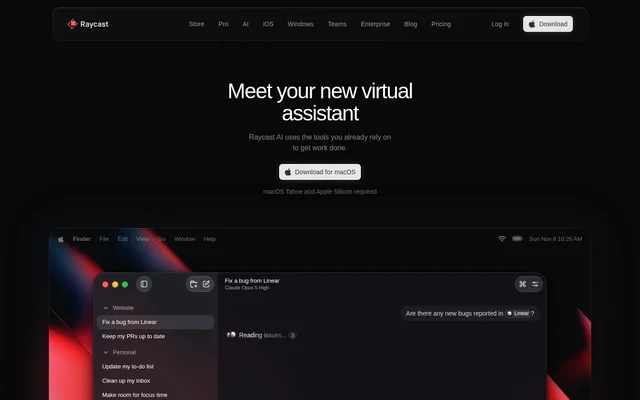
What is Raycast AI?
Raycast AI is an AI assistant built into Raycast that provides access to multiple language models through a shared interface. Raycast AI supports providers including OpenAI, Anthropic, and Perplexity, bringing AI assistance to operating-system workflows rather than limiting interactions to a separate model interface.
Raycast AI serves individuals and teams working on writing, software development, research, and administrative tasks. The product combines short requests through Quick AI with custom agents, project workspaces, and scheduled automations. Access belongs to Raycast’s paid Pro plans; the free Raycast plan provides productivity tools without AI.
What Raycast AI can do
Raycast AI combines prompt-based assistance with agents that use instructions, contextual information, and connected tools. The page describes capabilities ranging from editing text and finding code bugs to checking emails and preparing updates. Users can choose models and tailor agents to different kinds of work.
- Raycast AI creates custom agents with their own instructions and models.
- Raycast AI gives projects dedicated instructions and memory.
- Raycast AI uses Screen Awareness to provide on-screen context.
- Raycast AI schedules agents to handle recurring tasks.
- Raycast AI turns saved prompts into keyboard shortcuts.
- Raycast AI supports files and image generation.
- Raycast AI connects everyday tools through AI Extensions.
How Raycast AI works
Raycast AI offers Quick AI for small requests and AI Commands for frequently repeated prompts, such as fixing grammar or changing an email’s tone. Users can explore AI Extensions in the Raycast Store or build their own extensions for specific workflows. Custom extensions can also be shared privately within a team.
Raycast AI supports existing Claude or ChatGPT subscriptions and API keys from OpenAI, Anthropic, and Google without consuming AI Credits. Raycast AI also integrates with Ollama for local models. For usage covered by plan credits, consumption depends on the selected model and how much work the agent performs.
Who Raycast AI is for
Raycast AI addresses personal and team workflows across writing, development, planning, and support. The page presents agents such as Copy Editor, Code Reviewer, Researcher, Meeting Prep, and Support Agent. Project instructions and memory support work with ongoing context, while automations handle tasks that recur on a schedule.
- Raycast AI helps writers fix grammar, shorten emails, and adjust tone.
- Raycast AI helps developers find bugs and monitor pull requests.
- Raycast AI supports meeting preparation and action-item capture.
- Raycast AI supports recurring email checks and weekly updates.
- Raycast AI supports file organization and trip planning.
Raycast AI strengths and limitations
Raycast AI combines model choice, reusable prompts, tool connections, and recurring agent tasks. Raycast AI stores data locally by default; enabling Cloud Sync saves AI Chats on servers with encryption at rest and in transit. Provider agreements prohibit training on AI interactions, while Ollama integration provides a local-model option.
- Raycast AI requires a paid Pro plan beyond the eligible free trial.
- Raycast AI excludes advanced models from the free trial.
- Raycast AI credit usage varies with model choice and agent workload.
Raycast AI FAQ
What is Raycast AI?
Raycast AI is an AI assistant within Raycast that provides access to multiple language models, including models from OpenAI, Anthropic, and Perplexity. Raycast AI combines custom agents, connected tools, reusable prompt shortcuts, and scheduled automations for everyday work.
Is Raycast AI free?
Raycast AI is included in paid Pro plans, not Raycast Free. Eligible new accounts can start a free Pro trial with 500 AI credits and access to Pro models. Advanced models require Pro+ or Max and are excluded from the trial.
Can Raycast AI use existing ChatGPT or Claude subscriptions?
Raycast AI supports existing Claude and ChatGPT subscriptions, as well as API keys from OpenAI, Anthropic, and Google. Raycast AI usage through these connected subscriptions or keys does not consume AI Credits.
Does Raycast AI support local models?
Raycast AI supports local models through an integration with Ollama. Raycast AI presents local models as an option for complete privacy and also supports models from major hosted providers through the same interface.
What can Raycast AI automate?
Raycast AI can schedule agents for recurring tasks such as checking emails and preparing weekly updates. Raycast AI also presents workflows for syncing Linear tasks to Things, monitoring pull requests, capturing action items, and protecting focus time.
Does Raycast AI use conversations to train models?
Raycast AI states that its agreements with AI providers prohibit using AI interactions to train their models. Raycast AI stores data locally by default, while optional Cloud Sync stores AI Chats on servers encrypted at rest and in transit.
From the community
No reviews yet
Be the first to review this tool. What you write helps the next person choose.