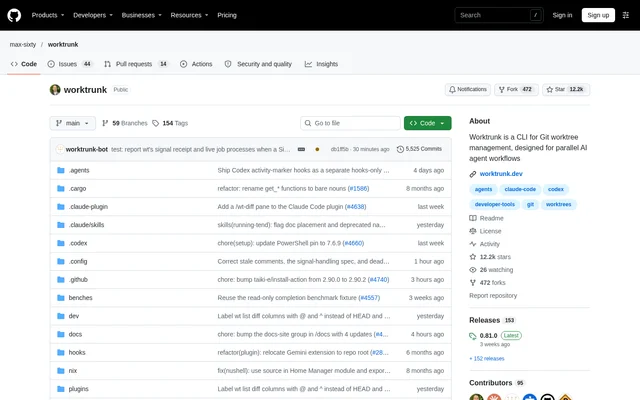
What is Worktrunk?
Worktrunk is an open-source CLI for managing Git worktrees, designed for developers running AI agents in parallel. Git worktrees give agents separate working directories so their changes do not interfere with one another. Worktrunk simplifies the commands used to create, navigate, inspect, and remove those directories. The repository describes Claude Code and Codex as examples of agents suited to this parallel working approach.
Worktrunk addresses worktrees by branch name rather than requiring developers to manage directory paths manually. Paths come from a configurable template, and commands that accept a branch can also accept the path of its checked-out worktree. This approach supports developers handling concurrent changes while retaining Git worktrees as the underlying mechanism.
What Worktrunk can do
Worktrunk combines worktree lifecycle commands with features for inspecting and automating parallel development. Worktrunk can launch a command after switching directories, show branch status, and consolidate local merge steps. Additional capabilities cover commit-message generation, pull request navigation, setup hooks, and build cache sharing, allowing developers to expand beyond basic worktree creation as their workflows require.
- Worktrunk creates and switches worktrees with wt switch.
- Worktrunk lists worktrees and their status with wt list.
- Worktrunk generates LLM commit messages from diffs.
- Worktrunk runs hooks on creation and around merge operations.
- Worktrunk previews CI status, diffs, logs, pull requests, and comments in an interactive picker.
- Worktrunk combines squashing, rebasing, merging, and cleanup.
- Worktrunk shares build caches through copy-on-write on APFS, btrfs, and XFS.
- Worktrunk checks out pull request branches directly.
How Worktrunk works
Worktrunk is installed through a package manager, followed by shell integration using wt config shell install. The documented workflow starts by creating a feature branch and worktree with wt switch --create feature-auth. Worktrunk then switches into that directory. Developers can inspect ongoing work with wt list, follow a pull request workflow, or use wt merge main for a local merge and cleanup.
Worktrunk can start an agent after entering a worktree through the -x flag, with arguments after -- passed to the launched command. The examples start Claude on separate feature tasks. Post-start hooks can automate dependency installation and development server startup. Worktrunk also offers branch-scoped variables and custom aliases for adapting commands and hook templates to local workflows.
Who Worktrunk is for
Worktrunk is intended for developers working on concurrent branches, particularly those assigning separate tasks to AI coding agents. Worktrunk supports both pull request workflows and local merging, so developers can choose how completed changes enter the main branch. The documented examples include authentication work, pagination fixes, and API tests performed in separate worktrees.
- Worktrunk separates parallel agent tasks into distinct working directories.
- Worktrunk helps developers inspect several active branches from the command line.
- Worktrunk automates recurring worktree setup through hooks.
- Worktrunk supports cleanup after pull request merges or local merges.
Worktrunk access and installation
Worktrunk is distributed as an open-source project through its public GitHub repository. Worktrunk installation instructions cover Homebrew on macOS and Linux, Cargo, Winget on Windows, Arch Linux packages, and a community-maintained Conda feedstock with Pixi as another option. Documentation is available at worktrunk.dev. The supplied repository text does not describe Worktrunk subscription plans or paid tiers.
Worktrunk strengths and limitations
Worktrunk brings branch-based navigation, worktree status, agent launching, and workflow automation into a command-line interface. Worktrunk also provides a combined local merge process and an interactive picker for reviewing active work. These capabilities address the directory management and repeated setup involved in parallel development, while some functions depend on shell configuration, operating-system command naming, or filesystem support.
- Worktrunk needs shell integration for commands to change directories.
- Worktrunk limits copy-on-write cache sharing to APFS, btrfs, and XFS.
- Worktrunk uses git-wt with Winget to avoid a Windows Terminal command conflict.
Worktrunk FAQ
What is Worktrunk?
Worktrunk is an open-source command-line tool for Git worktree management, designed for parallel AI agent workflows. Worktrunk helps developers create, switch, list, and remove worktrees while adding hooks, branch status inspection, and merge automation.
Who is Worktrunk for?
Worktrunk is for developers managing concurrent code changes, particularly developers running AI coding agents in parallel. Worktrunk uses Git worktrees to give agents separate working directories and supports both pull request workflows and local merging.
How do you install Worktrunk?
Worktrunk can be installed through Homebrew, Cargo, Winget, Arch Linux packages, Conda, or Pixi. Worktrunk documentation also instructs users to install shell integration so commands can change directories. Winget installs the git-wt command to avoid a Windows Terminal naming conflict.
Can Worktrunk run Claude in separate worktrees?
Worktrunk can launch Claude after creating and switching to a worktree. Worktrunk uses the -x flag to run a command after switching, and arguments after -- are passed to that command. The documented examples launch Claude on separate feature tasks.
Does Worktrunk support shared build caches?
Worktrunk supports copy-on-write build cache sharing on APFS, btrfs, and XFS. Worktrunk describes sharing directories such as target/ and node_modules/ across worktrees without rebuilding or copying them, with this capability limited to the listed filesystems.
How does Worktrunk automate merging?
Worktrunk provides a merge workflow that combines squashing, rebasing, merging, and cleanup in a command. Worktrunk also supports pre-merge and post-merge hooks, and the local merge example removes the completed feature worktree and branch after merging.
From the community
No reviews yet
Be the first to review this tool. What you write helps the next person choose.