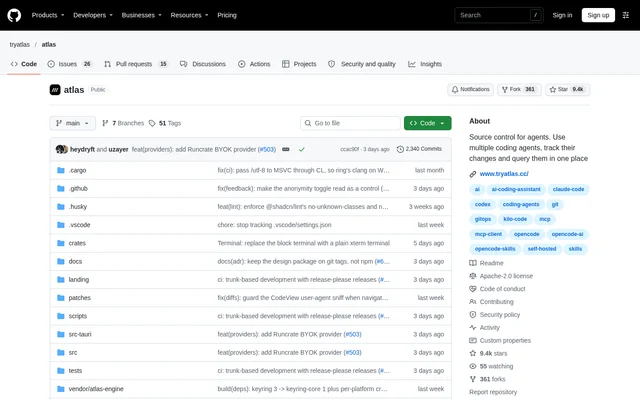
What is Atlas?
Atlas is an open-source workspace for running coding agents and tracing their work back to source-control changes. Atlas serves engineers who use agents to write code and engineering managers who need visibility into those changes. Recorded sessions connect prompts, responses, tool calls, and resulting commits rather than leaving code diffs separate from their context.
Atlas combines a desktop control-surface IDE with a terminal-oriented CLI. Both workflows can feed the same team timeline, allowing teammates to use different interfaces while contributing session records to a shared project. Local mode also supports individual work without an account or network connection.
What Atlas can do
Atlas brings agent execution, context management, and change history into one workspace. Claude Code and Codex receive the most support, while Atlas can also launch agents from the ACP registry. Shared memory and session briefings carry relevant project information between agents without rewriting the user's prompt.
- Atlas runs independent coding agent sessions in parallel.
- Atlas shares agent memory through an on-device memory server.
- Atlas resolves mentions of files, branches, notes, skills, and past sessions.
- Atlas records sessions and links their commits as checkpoints.
- Atlas supports team comments on sessions, prompts, responses, and tool calls.
- Atlas reports usage and estimated costs by project, agent, or model.
- Atlas lets users chat with checkpoints about the recorded session.
How Atlas works
Atlas runs Claude Code and Codex as external subprocesses over ACP, while the native Atlas agent runs in-process. Agents access shared memory through tools, and session briefings draw on earlier sessions and instruction files. Embeddings and retrieval run on the user's machine. Existing Claude Code or Codex subscriptions can be used through Atlas.
Atlas records sessions locally after capture is enabled for a project. Secrets are scrubbed before records reach disk, and observed commits are linked to their originating sessions even when created outside Atlas. For team collaboration, project session records can sync to the cloud; the source tree does not sync.
Who Atlas is for
Atlas targets engineers managing multiple coding agents and engineering managers overseeing agent-assisted development. Engineers can combine agent conversations with an editor, terminal, Git tools, and knowledge notes. Managers can inspect a shared timeline, comment while agents work, and compare AI spending with the commits produced by a project, person, or model.
- Atlas helps engineers carry corrections and project context between agents.
- Atlas helps teams investigate which session and prompt produced a change.
- Atlas helps managers review agent activity and spending.
- Atlas lets collaborators watch remote sessions and take control when invited.
Atlas pricing and access
Atlas is an open-source project distributed under the Apache-2.0 license. Desktop builds are available from the website or releases page for macOS, Windows, and Linux. The CLI installation is listed for macOS and Linux. Atlas supports offline local use without an account, while organization features involve signing in and creating an organization.
Atlas strengths and limitations
Atlas combines local session records, shared agent context, and commit-linked history with optional team collaboration. Checkpoint links survive rebases and amends through reconciliation. Support is not equally mature across agents: Claude Code and Codex receive the most attention, and quality assurance for the longer tail of ACP registry agents remains ongoing.
- Atlas requires session capture to be enabled separately for each project.
- Atlas orphans checkpoint links when a squash makes their association ambiguous.
- Atlas lists CLI support for macOS and Linux, rather than Windows.
Atlas FAQ
What is Atlas?
Atlas is an open-source coding agent workspace and source-control visibility tool. Atlas runs agents, records their sessions, and links prompts and tool activity to resulting Git commits, giving engineers and managers context for agent-generated changes.
Can Atlas work offline without an account?
Atlas supports fully offline local mode without an account. Atlas keeps local session records and provides on-device memory, embeddings, and retrieval. External coding agents still communicate with their own providers as they normally would.
Which coding agents does Atlas support?
Atlas supports Claude Code, Codex, and its native agent, and can launch agents from the ACP registry, including Cursor, OpenCode, and Kilo Code. Atlas gives Claude Code and Codex the most support; quality assurance for less common registry agents is ongoing.
How does Atlas connect agent sessions to Git commits?
Atlas records enabled project sessions locally and links observed commits to the sessions that produced them as checkpoints. Atlas preserves links through amends and rebases, but orphans a link rather than guessing when a squash makes the association ambiguous.
Does Atlas upload source code for team collaboration?
Atlas syncs the record of agent work for team collaboration, not the source tree. Atlas redacts secrets on the user's machine first. Shared project timelines let teammates inspect sessions and comment on prompts, responses, tool calls, and checkpoints.
Which operating systems does Atlas support?
Atlas provides desktop downloads for macOS, Windows, and Linux, including macOS builds for Apple Silicon and Intel. Atlas lists its CLI for macOS and Linux. Desktop installation requirements and packages are described in the repository's download section.
From the community
No reviews yet
Be the first to review this tool. What you write helps the next person choose.