What is herdrm?
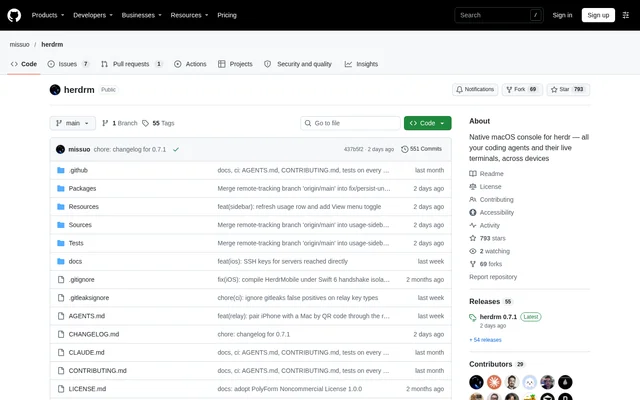
herdrm is a native macOS console for developers who run coding agents through herdr. herdr owns the agents' terminals and tracks whether agents are working, blocked, or finished; herdrm presents that information in a graphical interface. The app brings local and remote spaces, agents, and shell terminals into a shared sidebar.
herdrm is a GitHub-hosted project built with SwiftUI and an embedded Ghostty terminal. Supported agents include Claude Code, Codex, Gemini, Grok, and OpenCode. The repository positions the app as a clickable alternative to managing herdr sessions through terminal commands and multiplexers, while retaining access to the actual agent terminal.
What herdrm can do
herdrm combines terminal access with monitoring, file handling, and conversation review. The sidebar aggregates connected devices, while search helps users find agents across machines. Terminal attachment preserves the agent's interactive interface rather than summarizing output, and notifications provide a separate way to notice completed work or requests for input.
- herdrm attaches directly to agent and shell PTYs.
- herdrm shows live spaces, agents, and terminals across connected devices.
- herdrm searches agents across devices with the command-key search shortcut.
- herdrm sends system alerts when an agent finishes or needs input.
- herdrm transfers regular files between local and SSH locations.
- herdrm pastes files and images into supported coding agents.
- herdrm displays searchable saved Claude Code conversations.
How herdrm works
herdrm connects to the local herdr runtime and remote devices through SSH. Remote connections support OpenSSH keys or an agent, Tailscale SSH, and an in-app password prompt backed by the macOS login Keychain. Each remote device has its own reconnection loop, and the interface reports connection failures with diagnostic explanations.
herdrm starts the local herdr process when necessary. Users can add a remote device, choose a device and an available coding-agent CLI, and enter the live terminal. Local agent discovery checks the login-shell PATH; remote devices use the server's manifest catalog. Settings also accept a per-agent binary path when automatic detection is incorrect.
Who herdrm is for
herdrm serves developers who already use herdr and prefer a native graphical interface for navigating their coding sessions. The documented setup covers a local Mac alongside machines such as development boxes and home servers. Claude Code users also receive conversation-review features that read transcripts from the device where the agent runs.
- herdrm helps developers monitor agents distributed across local and remote machines.
- herdrm lets users open persistent shell terminals within a device and space.
- herdrm lets Claude Code users search, read, and copy saved conversation messages.
- herdrm supports uploading and downloading regular files with conflict handling.
herdrm pricing, licensing, and installation
herdrm is free to use, modify, and share for noncommercial purposes under PolyForm Noncommercial 1.0.0. Commercial use requires a separate licence from the maintainer. Installation is available through the owo-network Homebrew cask or a ZIP download from the repository's Releases page, followed by moving the app into Applications.
herdrm requires macOS 14+ and herdr installed locally and on remote machines. The universal download supports Apple Silicon and Intel, and updates are delivered through Sparkle. The repository identifies itself and the Homebrew cask as the only official sources and states that genuine builds are signed by MOE AI LLC and notarized by Apple.
herdrm strengths and limitations
herdrm combines direct terminal attachment, cross-device visibility, and native macOS controls without an Electron or browser-based interface. Automatic reconnection, file-transfer conflict handling, and alerts address practical multi-device workflows. However, the repository warns that herdrm may be discontinued because herdr now offers an official GUI; existing releases work, but further development and releases are not guaranteed.
- herdrm is limited to supported macOS systems and requires the herdr runtime.
- herdrm requires a separate licence for commercial use.
- herdrm cannot show Claude history on Tailcat devices without shell access.
- herdrm turns on each agent's bypass-permissions flag by default.
herdrm FAQ
What is herdrm?
herdrm is a native macOS console for the herdr coding-agent runtime. herdrm displays spaces, agents, and terminals across local and SSH devices, with direct terminal attachment, live status, cross-device search, notifications, and file-management features.
Is herdrm free?
herdrm is free to use, modify, and share for noncommercial purposes under PolyForm Noncommercial 1.0.0. Commercial use requires a separate licence from the maintainer. Downloads are available through the official GitHub repository and Homebrew cask.
What does herdrm require?
herdrm requires macOS 14+ and herdr installed locally and on remote machines. Remote access uses OpenSSH, Tailscale SSH, or a Keychain-stored password. The app supports both Apple Silicon and Intel Macs through a universal binary.
Can herdrm manage coding agents over SSH?
herdrm manages coding agents and shell terminals on remote devices over SSH alongside local sessions. Remote devices appear in the shared sidebar, have independent automatic reconnection, and support terminal attachment, file transfers, and remote file or image pasting.
Does herdrm show Claude Code conversation history?
herdrm shows a Claude Code prompt timeline and saved conversations with search, paging, and message copying. Conversation history is read from transcripts on the agent's device, locally or over SSH. Tailcat devices show no history because they lack shell access.
Is herdrm still being developed?
herdrm may be discontinued because herdr has released an official GUI covering the project's original purpose. The repository says existing releases still work with official herdr, but new development may stop and future features, fixes, and releases are not guaranteed.
From the community
No reviews yet
Be the first to review this tool. What you write helps the next person choose.